
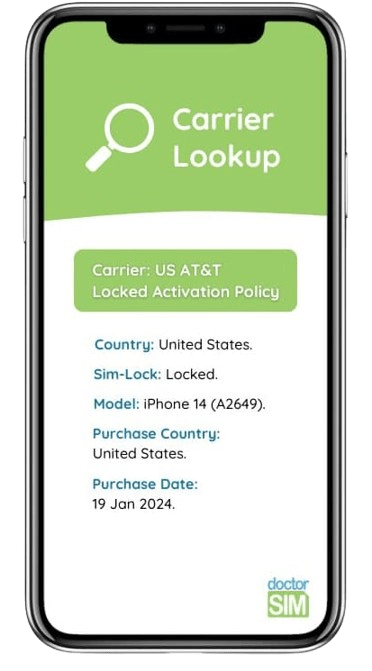
Check iPhone Unlocking Option
Want to know if an iPhone can be unlocked?
- Find out which operator it belongs to and if it has any reports.
- Recommended if you are going to buy a used iPhone
- Find out which unlocking service you need

Trust, Security, and Integrity
Over 8 million top-ups, gift cards, and check-ins

Extremely Happy Customers
Over 26,000 reviews between Google and Trustpilot

Low Price and Guaranteed Service
Nearly 20 years of complete transparency and the lowest prices
27,000 reviews of doctorSIM

Top.
Top.
Molto semplice ed immediato
As usual everything went smooth as…
As usual everything went smooth as silk. DoctorSIM team is always ready to help and assist to complete your transaction is a professional and friendly manner. Topping up from abroad to help a family member or a friend in a few minutes is priceless. Thank you again!
very nice and smooth experience
very nice and smooth experience. First top to TIM Brasil didnt work because TIM is bad provider. The money stayed in between. So I asked DoctorSIM to change the top up to VIVO (another number of mine) and the money were delivered in 5 minutes to VIVO number, so I could use the data and so on. DoctorSIM works perfectly with top ups.
Video: How to unlock a cell phone
FAQs
What's the IMEI code?
It's a unique identity number for each electronic device.
It stands for International Mobile System Equipment Identity, it is 15-17 digits long, and it can not be changed, as changing it might leave the device useless.
The safest way to get the IMEI is by typing *#06# on the dial pad, and if your device is dual-SIM, both IMEI codes will appear here. It is not recommended getting the IMEI code from the invoice, the back of the phone or from the sticker under the battery, as sometimes the IMEI displayed here does not match the actual IMEI of the device.
Make sure to keep your IMEI safe, and don't share it with any company you don't fully trust.
How can I know if my iPhone needs to be unlocked?
Usually, when you purchase an iPhone device with a company, it is network locked to that company. If you want to use it with other networks, you need to network unlock it.
You can check if your iPhone is network locked or not by inserting an active SIM card from a different carrier and see if the phone displays the message "SIM Not Supported".
If you can't run this check, we can help you check if your iPhone is unlocked by IMEI with our Locked/Unlocked Status iPhone Check.
Can I trust doctorSIM?
We have more than 13 years of experience helping our customers, all over the world, and we protect your information with the most exigent Security and Protection Certificates. We'll only need your phone's IMEI to provide you the IMEI check services you need, and you don't need to worry, as your data will be completely safe.
We also recommend keeping your IMEI code safe, and not sharing it with any shady companies, as it's sensitive information.
Why unlock your cell phone with doctorSIM?

REPUTATION
This is the service recommended by operators and manufacturers.

SPEED
It is the easy, fast, safe, and legal way to unlock.

SAFETY
You keep your phone's warranty intact.

WARRANTIES
Do not let go of your cell phone at any time.

RELIABILITY
You can use it during the release process.

EASY
Easy-to-follow release instructions.

SUPPORT
The best customer service at your disposal.

VERSATILITY
You can use your cell phone with any carrier in the world.

Official report from Blacklist Initiative. Find out if you have been reported or blacklisted for loss, theft, or non-payment. Detailed by country and operator.

Check if your iPhone is unlocked before purchasing an IMEI unlock from doctorSIM.

Find out if your phone can be unlocked.
Recommended before buying a used phone.
Find out if your phone can be unlocked.
Recommended before buying a used phone.

Check if your iPhone has an active iCloud account. You will
need to know the passwords to be able to use the device!

Check if your Xiaomi Mi Account is active. Quick and
official check from Xiaomi.


Check if your device is in our database of reported phones. Limited consultation.
Most frequently sent top-ups
Most desired gift cards
More unlocked phones
All about doctorSIM



 Select your language