

Unlock your MetroPCS with the Device Unlock App
The fastest, safest, and most efficient way to permanently unlock your phone
- The only way to unlock your smartphone from the MetroPCS network
- Legal and doesn't void the phone's warranty
- No technical knowledge needed
How to unlock your device from MetroPCS with the Device Unlock App
Back in 2014, MetroPCS changed the way certain Android smartphones could be unlocked from their network. By pre-installing a Device Unlock App on the phone, MetroPCS customers can now request and apply a mobile device unlock directly from the device.
This is the only way to unlock a Samsung, LG, Alcatel, HTC, Huawei, Kyocera, Motorola, Sony Xperia or ZTE phone from the MetroPCS network with the Device Unlock App.
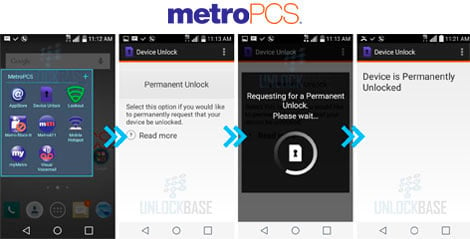
If MetroPCS has pre-installed the Device Unlock App on your smartphone, which can be found under the Applications icon, you'll need to follow the steps below to unlock your phone:
- Request your unlocking below by selecting the make of your phone locked to MetroPCS and then our Device Unlock App Service. DO NOT choose any other unlocking service. As the process is fully automated, we will be unable to issue a refund if any of the information submitted is incorrect.
- Once your unlocking request has been processed, we will send you an e-mail letting you know that the phone's IMEI number has been registered as unlocked on the MetroPCS server.
- Insert a SIM card from a network that is not from MetroPCS.
- Launch the Device Unlock App and select the "Permanent Unlock" option.
- The following message will be displayed: "Unlock Approved: Mobile device is permanently unlocked".
Brands with Device Unlock









FAQ for MetroPCS Device Unlock App
This service permanently unlocks the phone so it can be used with any network provider in the world.
The network providers using this application to unlock phones from their network are MetroPCS and T-Mobile.
Why unlock your MetroPCS phone with doctorSIM?
- The recommended method by the phone manufacturers and network providers.
- Backed by over 5 million successful unlockings to date.
- Fastest turnaround.
- You can continue to use your phone as normal during the unlocking process.
- Simple step-by-step instructions sent directly to your e-mail.
- 100% guaranteed or your money back.
- Lowest prices on the internet.
- 24/7 customer service.
Video
27,000 reviews of doctorSIM

Hassle Free & Super Fast Top-ups.
We have been using DoctorSIM for topping up our SIM cards for many years now, and we have consistently had an excellent experience.
The service has always been fast, reliable, and professional, with very reasonable rates and an impressive range of networks available globally. This is a real advantage compared with many other providers in the same business.
On one occasion, we accidentally entered an incorrect SIM/telephone number when making a top-up. As the funds could not be applied, DoctorSIM promptly processed a full refund back to the card we had originally used for the payment. Their response was quick, professional, and hassle-free.
And our most recent experience says it all: we topped up a SIM just a few moments ago, and the funds were credited within approximately three seconds. You simply cannot ask for much better service than that.
All in all, DoctorSIM has consistently delivered a first-class service over the years. We have no hesitation in recommending them 100% and will certainly continue using their services.
i love dr sim
i love this system its fast, user friendly, ive never come across any problems with it and honestly its just so useful and practical, i use it to buy my friend data every so often to help him out, but theres so many other features its so cool!! and i trust that they wont steal my info and sell it or anything too i love dr sim!!!!!!
very nice and smooth experience
very nice and smooth experience. First top to TIM Brasil didnt work because TIM is bad provider. The money stayed in between. So I asked DoctorSIM to change the top up to VIVO (another number of mine) and the money were delivered in 5 minutes to VIVO number, so I could use the data and so on. DoctorSIM works perfectly with top ups.
Most frequently sent top-ups
Most desired gift cards
More unlocked phones
All about doctorSIM



 Select your language