
Unlock your MetroPCS with the Device Unlock App
The fastest, safest, and most efficient way to permanently unlock your phone
- The only way to unlock your smartphone from the MetroPCS network
- Legal and doesn't void the phone's warranty
- No technical knowledge needed
How to unlock your device from MetroPCS with the Device Unlock App
Back in 2014, MetroPCS changed the way certain Android smartphones could be unlocked from their network. By pre-installing a Device Unlock App on the phone, MetroPCS customers can now request and apply a mobile device unlock directly from the device.
This is the only way to unlock a Samsung, LG, Alcatel, HTC, Huawei, Kyocera, Motorola, Sony Xperia or ZTE phone from the MetroPCS network with the Device Unlock App.
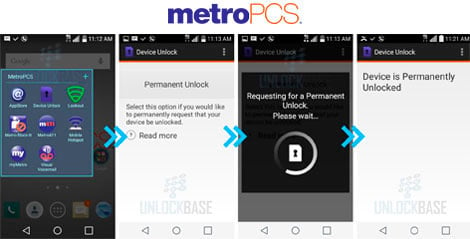
If MetroPCS has pre-installed the Device Unlock App on your smartphone, which can be found under the Applications icon, you'll need to follow the steps below to unlock your phone:
- Request your unlocking below by selecting the make of your phone locked to MetroPCS and then our Device Unlock App Service. DO NOT choose any other unlocking service. As the process is fully automated, we will be unable to issue a refund if any of the information submitted is incorrect.
- Once your unlocking request has been processed, we will send you an e-mail letting you know that the phone's IMEI number has been registered as unlocked on the MetroPCS server.
- Insert a SIM card from a network that is not from MetroPCS.
- Launch the Device Unlock App and select the "Permanent Unlock" option.
- The following message will be displayed: "Unlock Approved: Mobile device is permanently unlocked".
Brands with Device Unlock









FAQ for MetroPCS Device Unlock App
This service permanently unlocks the phone so it can be used with any network provider in the world.
The network providers using this application to unlock phones from their network are MetroPCS and T-Mobile.
Why unlock your MetroPCS phone with doctorSIM?
- The recommended method by the phone manufacturers and network providers.
- Backed by over 5 million successful unlockings to date.
- Fastest turnaround.
- You can continue to use your phone as normal during the unlocking process.
- Simple step-by-step instructions sent directly to your e-mail.
- 100% guaranteed or your money back.
- Lowest prices on the internet.
- 24/7 customer service.
Video
27,000 reviews of doctorSIM

Top up made stress-free
I used doctorSIM to top up some airtime and it went super smoothly. The site is straightforward to navigate, the payment went through without a hitch, and the credit hit the phone almost instantly. Definitely a reliable, hassle-free option whenever you need a quick recharge or gifting phone credits to any phone carrier around the world. Double thumbs up 👍 👍
Recuestes Doctor SIM the unlock…
Recuestes Doctor SIM the unlock service, however, my phone was rejected. Doctor SIM generously refunded me what I paid for the service. If I ever have another phone that I want to unlock I will definitely go this guys! Real MVPs.
Thank you, for understanding!
Leopoldo.
My successful experience of using doctorSim
My experience of using doctorSim is successful. I use doctorSim for recharging my phone balance as I live very far from my home country now and there are no common ways for me to top up my phone. DoctorSim helps me do this reliably and quickly. I would especially like to highlight the work of the support team. They are ready to help in any issues very quickly 24/7. I am really pleased and grateful for their service.
Most frequently sent top-ups
Most desired gift cards
More unlocked phones
All about doctorSIM


 Select your language